
Introduction
Someone who left your company months ago may still have access to your most sensitive data. You just do not know it yet.
She resigned professionally. She gave two weeks notice. She completed her handover documents, returned her laptop, and left on good terms. Eight months later, she was working at a competitor. Her Google Drive account still had full access to every client proposal, every pricing document, and every sales strategy your company had produced in the past three years.
Nobody had removed her account. Nobody had checked. The IT team assumed HR had handled it. HR assumed IT had handled it. And in the gap between those two assumptions, three years of your most sensitive business information had been sitting accessible to a person who now works for your competitor.
This is not a story about a malicious insider. It is not a story about someone who planned to steal your data. It is a story about a process that most businesses do not have, and about what happens in the silence where that process should be.
How Common Is This? More Than Most Owners Realise
The numbers on employee offboarding failures are striking. Not because businesses do not care, but because nobody has ever taken the time to identify and close all the accounts that should have been removed.
- 50% of former employee accounts remain active for more than a day after the person leaves.
- 43% of businesses have ex-employees who can still access company code repositories.
- 32% of organisations say it takes over 7 days to fully remove a departed employee’s access.
- 91% of employees in one study still had access to company files after offboarding earlier that year.
The 8 Systems Your Former Employees Can Still Access Right Now
Think about every employee who has left your company in the last two years. Now think about every system they had access to. These are the systems that are typically left open, and what each one means for your business.
| System / Platform | What ex-employees can still access | Risk if left open |
| Company Email | Read historical emails, access sent items, receive forwarded messages | CRITICAL |
| Google Drive / SharePoint | Download all shared files, client documents, financial records | CRITICAL |
| CRM (Salesforce, Zoho, HubSpot) | Export full client list, deal history, pricing notes, contact data | CRITICAL |
| Accounting Software (Tally, QuickBooks) | View invoices, payment records, bank account details | HIGH |
| Project Management (Jira, Asana, Trello) | Access ongoing project plans, client communications, timelines | MEDIUM |
| Slack / Teams / WhatsApp Groups | Read internal discussions, strategic conversations, DMs | MEDIUM |
| GitHub / Code Repositories | Download source code, view API keys, access product roadmaps | HIGH |
| Social Media & Marketing Accounts | Post as the company, change passwords, access ad accounts | HIGH |
The average employee today uses 29 different SaaS applications in their work. When they leave, each one becomes a potential open door, and in most companies, nobody has a complete list of which doors exist, let alone which ones have been closed.
The access you give someone on their first day is still there on their last day, unless someone actively removes it. Most companies never do.
When It Goes Wrong: A Real Incident
American First Finance, a consumer finance company, discovered in 2025 that a former employee had been improperly accessing and exporting sensitive customer data for two years, well after their departure.
The cause was simple. Their account in FinWise Systems, a third party data processing platform, had never been deactivated. The former employee retained access to the financial records of approximately 689,000 customers, including full names, personal identifiers, and sensitive financial account data.
The breach required mandatory disclosure to regulators, customer notification, legal costs, and reputational damage to both companies. The root cause was not sophisticated hacking. It was a checkbox that nobody ticked on an offboarding form.
This case is not exceptional. 1 in 5 data breaches involves a former employee within six months of their departure. Most of them do not involve malicious intent. They involve access that was never removed and, at some point, either used or compromised by someone else.
Two Different Threats From the Same Problem
Business owners tend to think about this issue in terms of malicious ex employees, such as the disgruntled developer who deletes files or the former sales head who takes the client list. Those cases happen, but they are not the most common risk.
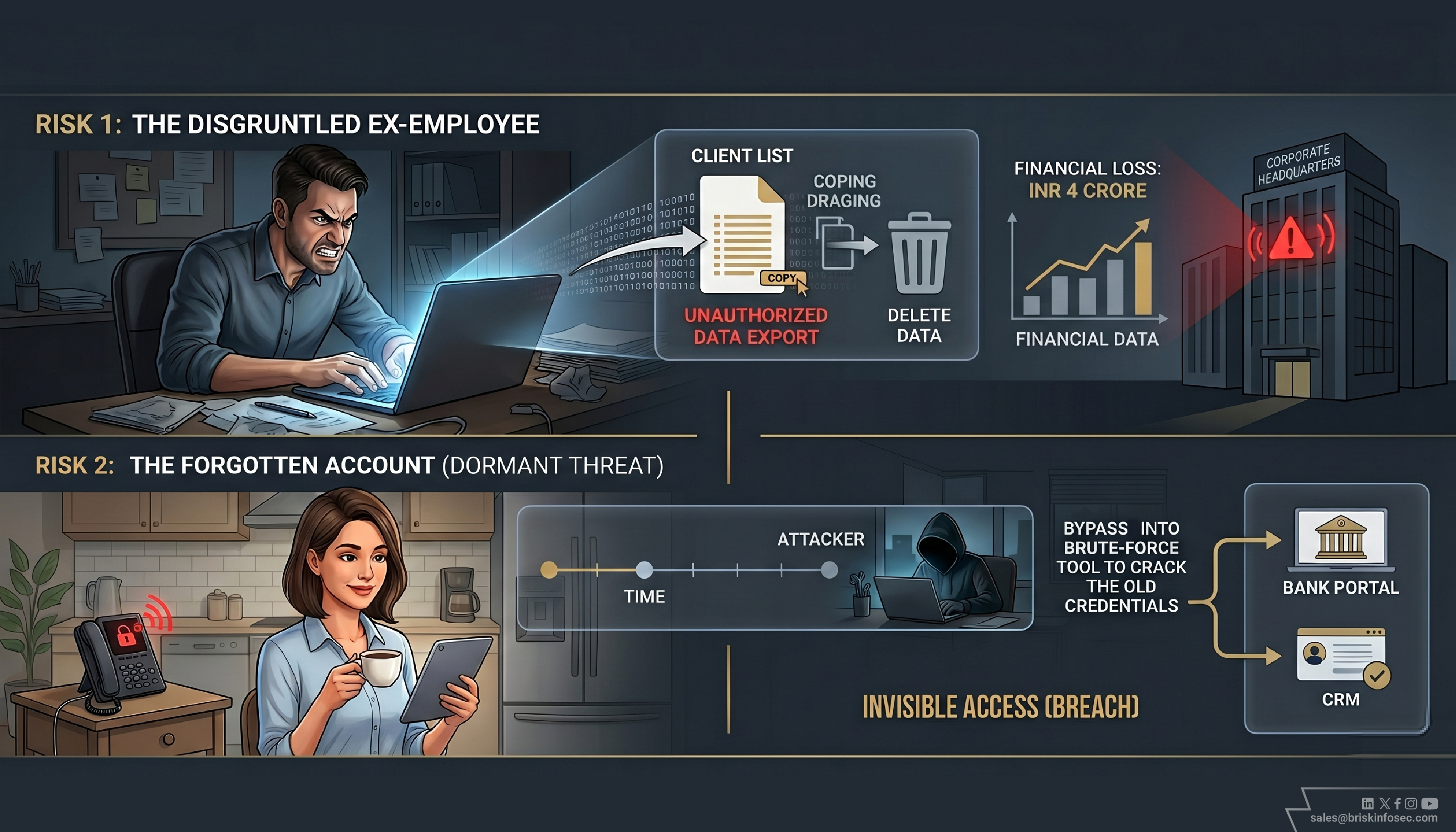
Risk 1 - The Disgruntled Former Employee
This is the scenario most people imagine: someone who leaves unhappy and decides to cause harm. They still have access to your systems. They delete files, export the client database, or share internal communications publicly.
These cases account for a significant portion of insider threat incidents, and malicious insider attacks cost an average of Rs 4 crore per incident according to IBM's 2025 research. But they are the easier risk to anticipate, because the departures that go badly are usually visible.
Risk 2 - The Forgotten Account that Gets Hacked
This is the more common and more invisible risk. The former employee leaves on good terms. Their account sits dormant. At some point, months or years later, their personal credentials are exposed in a separate data breach, or their personal email is compromised.
An attacker checks whether their old work credentials still work. They do. Suddenly someone with no connection to your company is logging in as a former employee, and they look to every security system you have exactly like an authorised user.
IBM research shows that breaches involving compromised credentials take an average of 292 days to detect, nearly 10 months of invisible access. The former employee did nothing wrong. Their account was simply never closed.
The Offboarding Checklist Most Companies Do Not Have
The fix for this problem is not expensive technology. It is a one-page checklist that HR and IT complete together, on the same day, every time someone leaves. Here is what it needs to cover.
1. Disable the primary email account immediately on the same day
Not within a week. Not when IT gets around to it. On the day the person leaves. Set an auto reply if needed for business continuity, but revoke login access immediately. The email account is the master key, and with access to it, a former employee can trigger password resets for virtually every other system.
2. Run a full audit of every SaaS tool the employee used
Ask IT to pull up the list of applications that account was linked to. This is not a guess, every modern IT system has an activity log. Go through it. Remove the account from every tool, one by one. Do not assume that deactivating the main email account automatically deactivates everything else. In most cases, it does not.
3. Change every shared password the employee knew
Social media accounts. Shared inboxes. WiFi passwords. Any system where multiple people use the same login. If the departing employee knew it, change it. This is especially important for marketing accounts, where a disgruntled former employee could cause reputational damage at scale.
4. Remove from all communication channels
WhatsApp groups. Slack workspaces. Microsoft Teams channels. Email distribution lists. LinkedIn company admin access. Former employees should not receive ongoing internal communications after they leave, even accidentally. Check every channel individually.
5. Do a 30 day check
Thirty days after someone leaves, have IT confirm that no login activity has occurred on any of their former accounts. This catches accounts that were missed in the initial offboarding. It takes ten minutes and has saved multiple companies from discovering a dormant access problem six months too late.
The Harder Question: What About Everyone Who Already Left?
Most businesses reading this will have cleaned up their offboarding process going forward by the end of this article. The harder question is: what about the people who left last year? And the year before?
Think about how many people have left your company in the last three years. Now think about when you last audited the access those specific accounts still have. For most businesses, the answer is never. Those accounts are still there. Some of them are still active.
Running a retroactive access audit, checking every former employee against every active account in your systems, sounds overwhelming. It does not have to be. A focused half day with your IT team, going system by system through a list of people who have left, will identify most of the open doors. What you find will almost certainly surprise you.
This is not about blame. Nobody deliberately left these accounts open. They were open because most businesses build their security processes around keeping attackers out, and forget to build processes around the people who were once inside.
One Question to Ask Your IT Team Today
You do not need to run a full audit today. You need to ask one question that will tell you how serious this gap is in your company.
Ask this today:
"Can you give me a list of every active account in our key systems, such as Google Workspace, our CRM, and our accounting software, that belongs to someone who is no longer with the company?"
If your IT team can produce that list quickly, you are in reasonable shape. If they cannot produce it at all, or if it takes more than a few days, you have a gap that needs urgent attention.
The list they produce will be your starting point. Every account on it is an open door. Close them one by one. That is not a technology project. It is an afternoon.
Your Responsibility
Every account you create for an employee is an obligation. When they join, that account helps them do their job. When they leave, that account becomes your liability until you remove it.
The former employee did nothing wrong. She left professionally and moved on with her career. The Google Drive access was your company's responsibility to remove, and it was not removed. For months, valuable business information remained accessible to someone outside your organisation.
The fix is simple. A checklist, a half day, and one question to your IT team. Start there.
FAQ
1. What is employee offboarding in cybersecurity?
Employee offboarding is the process of removing all system access, accounts, and permissions when an employee leaves a company. It ensures that former employees cannot access sensitive data or systems after their departure.
2. What happens if employee access is not removed after resignation?
If access is not removed, former employees or attackers can log in to company systems, access confidential data, or misuse accounts. This can lead to data breaches, financial loss, and reputational damage.
3. How quickly should access be removed during employee offboarding?
Access should be removed immediately on the employee’s last working day. Delays increase the risk of unauthorized access and data exposure.
4. What systems should be disabled when an employee leaves?
All critical systems should be disabled, including email accounts, cloud storage, CRM tools, accounting software, communication platforms, and any shared credentials or admin access.
5. How can businesses audit existing access risks from former employees?
Businesses can run an access audit by reviewing all active accounts across systems and matching them with current employees. Any account linked to a former employee should be identified and removed.