
Introduction:
A minute by minute breakdown of a silent breach and what eventually gave it away.
They did not steal everything at once. They watched. They read emails. They learned who approved payments, who was about to leave, and who trusted whom. By the time anyone knew the company had been breached, the attacker already understood the business better than most employees did.
The attack described below is based on real incident patterns documented across hundreds of investigated data breaches. The timeline, the entry point, the silence, and the discovery all reflect what actually happens inside a compromised company. The only thing changed is the name.
Read it as if it is your company. Because statistically speaking, it may already be.
The Numbers Before the Story
Before we walk through the timeline, here is the reality of what silent breaches look like at a scale across thousands of companies.
- 181 average days a breach goes undetected, more than 6 months.
- 204 days on average before companies identify a breach.
- 88% of SMB breaches in 2025 involved ransomware, up from 39% for large companies.
- ₹4Cr+ average total cost for a small business breach including downtime and recovery.
Sources: SonicWall 2026 Cyber Protect Report, IBM Cost of a Data Breach 2025, Verizon DBIR 2025
It Starts Somewhere Small
The company is a 60-person professional services firm. Good reputation. Active client base. A small IT team that handles day-to-day issues. No dedicated security teams. Like most businesses of that size.
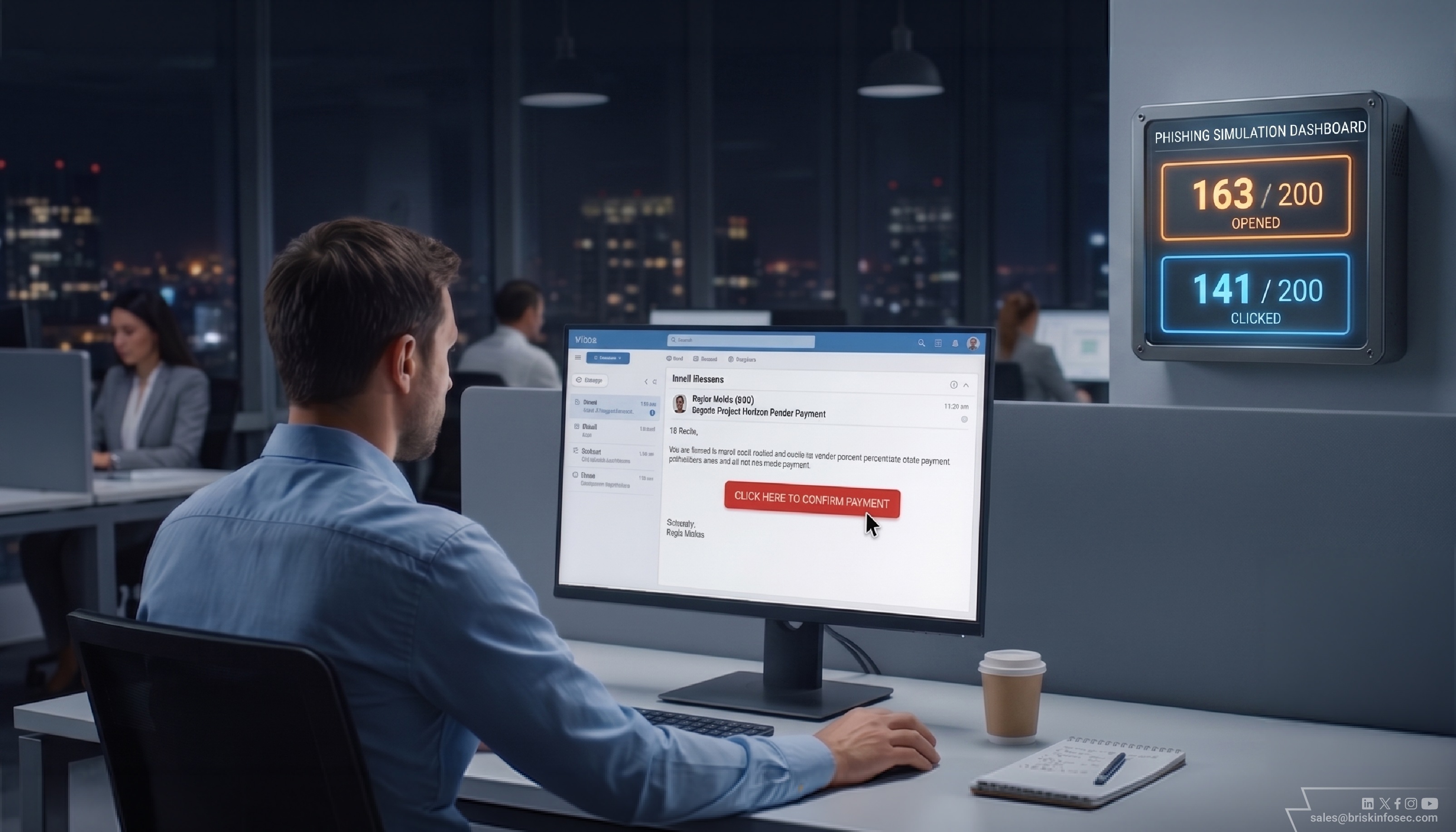
Three months before the breach is discovered, an employee gets an email. It looks like a password reset from Microsoft. She clicks the link, enters her credentials into what appears to be the company login page. The page loads her email normally. She notices nothing unusual.
She has just handed an attacker a valid username and password to your company's email system.
The entry point is almost never dramatic. It is one email, one click, one reused password. And then the waiting begins.
Six Months. Day by Day.
This is what the attacker does with that access and why nobody notices for so long.
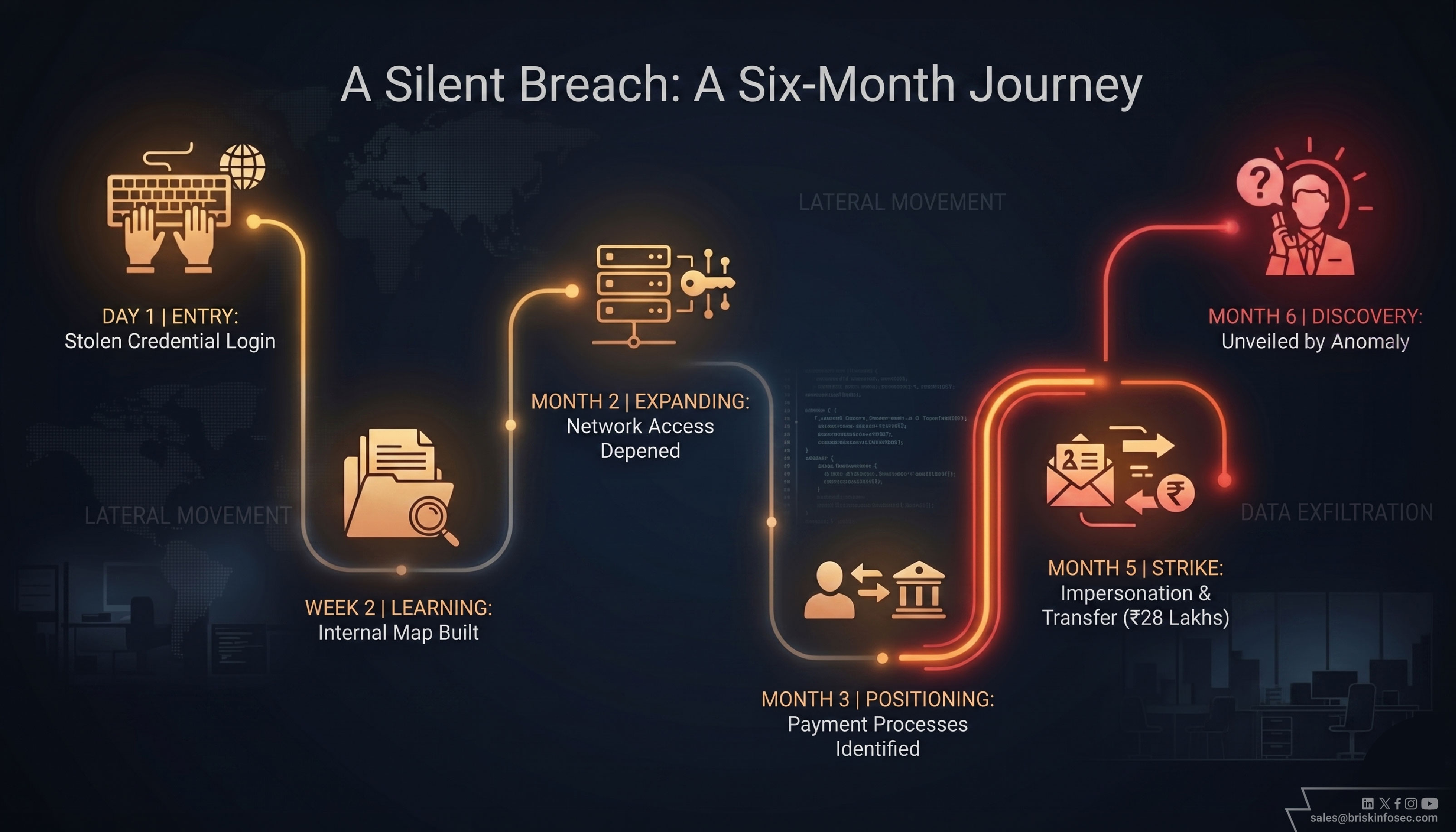
Day 1 - Entry | The attacker logs in quietly
Using the stolen credentials, they access the company's email from an overseas IP address. No alarm is triggered because it is a valid login with a real password. To every system in the company, this looks exactly like a normal employee logging in from a new device.
Week 2 - Learning | Reading everything, touching nothing
The attacker does not steal anything yet. They read emails. They learn the names of key clients, the payment approval process, who talks to who, how invoices are worded, which clients are large, and which are in contract renewal. They are building a map of the business from inside.
Month 2 - Expanding | Moving deeper into the network
With the initial foothold secure, the attacker uses the compromised account to gain access to shared drives and internal tools. They now have documents: client contracts, financial reports, pricing lists, upcoming project proposals. Still no alarm. They look like an employee.
Month 3 - Positioning | Setting up for the strike
The attacker identifies two things, who approves wire transfers and which bank accounts are used for large client payments. They also create a backup access path in case the original password gets changed. They are now so embedded in the company's systems that removing them would require knowing they are there.
Month 5 - Strike | The first money moves
Using their months of observation, the attacker sends a near-perfect impersonation email from what appears to be the company's largest client. The email requests a change of bank account for an upcoming payment. It uses the right client name, references a real ongoing project, and mimics the writing style of the client's actual contact person. The finance team processes it. ₹28 lakhs are transferred to an account the attacker controls.
Month 6 - Discovery | A small anomaly in a routine call
The breach is discovered not by any security system, but because the real client calls to follow up on an overdue payment. The finance team realises the account they paid is not one they recognise. The investigation begins. Within 48 hours, it becomes clear the company has had an uninvited guest for six months.
The most damaging part was not what the attacker took. It was how long they had been watching before they took it.
The Recovery. It Was Not Quick.
What followed the discovery was not a clean, orderly response. It was six weeks of chaos, including forensic investigation, legal fees, client notifications, regulatory reporting, emergency IT work, and the slow realisation of how much had been seen.
What the Company Actually Paid For
- ₹28 lakhs — the direct wire transfer loss
- ₹14 lakhs — forensic investigation and incident response firm
- ₹8 lakhs — legal advice on client notification obligations
- ₹6 lakhs — emergency IT work to close access paths and rebuild compromised systems
- ₹22 lakhs — estimated lost revenue during the 6-week disruption period
- 2 clients — who moved their business to a competitor after the incident became known
- 18 months — the time it took to return to pre-breach revenue levels
The total cost crossed ₹80 lakhs for a company that had been spending less than ₹5 lakhs per year on IT security.
That is not unusual. According to IBM's research, the average breach lifecycle, from entry to detection, is 204 days. And the longer an attacker is inside, the higher the total cost.
Why Did Nobody Notice for Six Months?
This is the question every business owner asks when they hear a story like this. The honest answer is uncomfortable: the attacker did not need to do anything suspicious. They used real credentials. They accessed real systems. They read real files. They looked, to every monitoring tool the company had, exactly like an authorised user having a normal workday.
THE INVISIBILITY OF A PATIENT ATTACKER
Traditional security tools are designed to catch unusual behaviour, such as someone trying 500 wrong passwords, a virus spreading across the network, or an unknown program trying to run itself.
A patient attacker who logs in with valid credentials, reads email slowly, and accesses shared files during business hours triggers none of those alerts.
The only way to catch this kind of intrusion is to look for behavioural patterns over time, such as logins from unusual locations, access at unusual hours, and large volumes of files being read by a single account. Without someone specifically monitoring for those patterns, the attacker can stay invisible indefinitely.
Most small businesses have nobody doing that monitoring. Not because they do not care, but because nobody told them it was possible or necessary.
The 2 Signs Most Businesses Miss
Looking back at the breach above and at hundreds of similar cases, two warning signs appeared well before the money moved. Neither was recognised at the time.
1. A login from an unfamiliar country
Two weeks after the initial compromise, the employee's email account was accessed from an IP address in Eastern Europe. She was not travelling. The login happened at 2 AM. A system that monitored login geography and timing would have flagged this immediately. Most small business email setups do not have this monitoring turned on by default.
2. An unusual volume of file access
In month two, the compromised account accessed 340 files in a single day, three times the typical daily volume for that employee. She was not working unusually hard. Someone else was reading her files. Without baseline activity monitoring, this spike passed unnoticed.
Two signs. Both detectable. Neither caught. That is the difference between a ₹5 lakh security investment that includes monitoring, and a ₹80 lakh breach that did not.
3 Things to Do Before You Finish Reading This
You do not need a large budget or a full security team. You need three specific things in place.
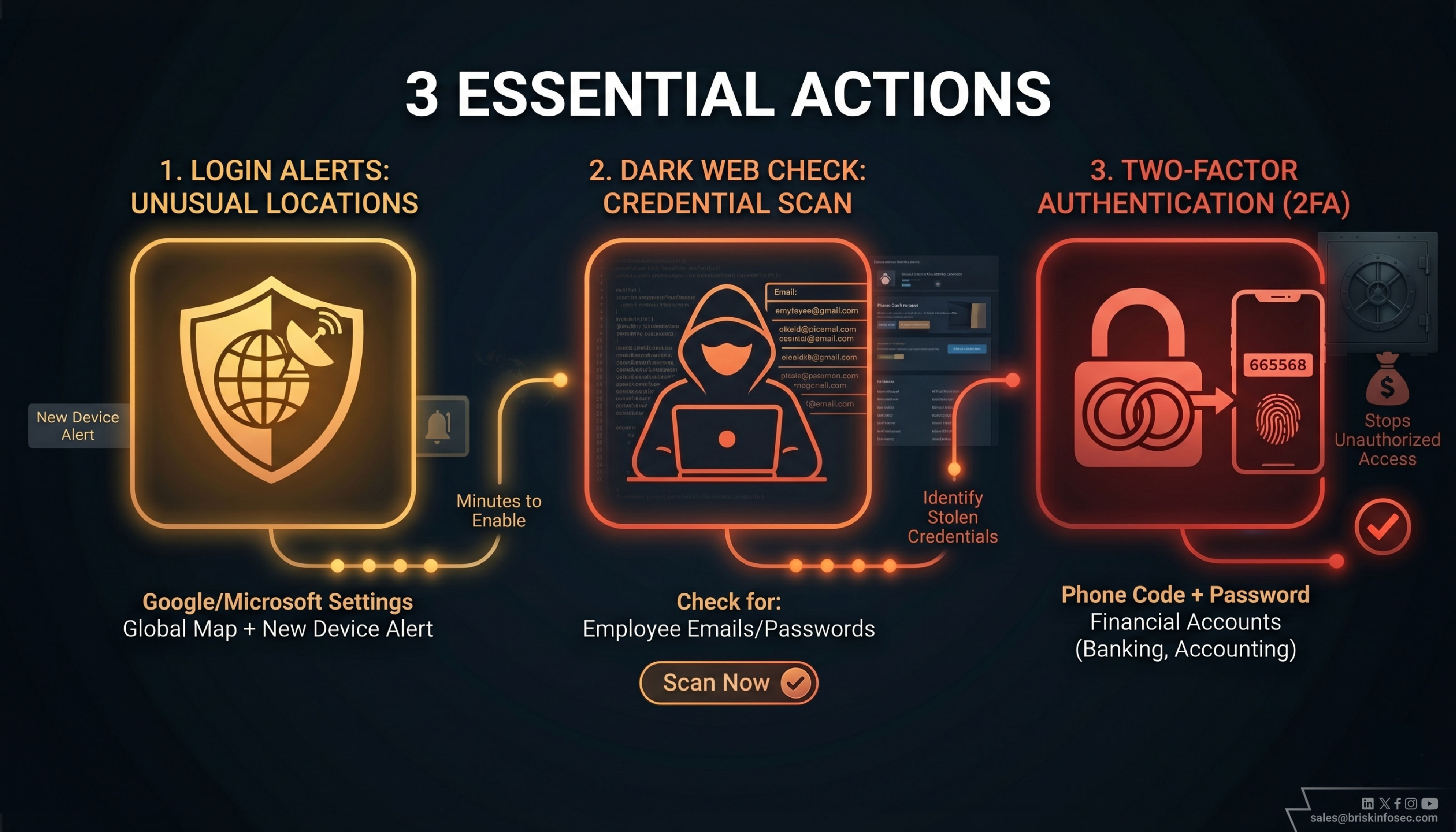
Action 1 - Turn on Login Alerts For Unusual Locations
Most business email systems, whether you use Google Workspace or Microsoft 365, have a setting that sends an alert when an account is accessed from a new country or device. It takes five minutes to enable. It would have flagged the breach above on day fourteen instead of month six.
Ask your IT team today: "Are login alerts turned on for all company email accounts?" If they say no, or they are not sure, that is your first action.
Action 2 - Search for Your Company's Credentials on the Dark Web Right Now
Before an attacker uses a stolen password, they obtained it somewhere, such as a previous breach, a phishing attack, or a leaked database. Many companies do not know their employee credentials are already for sale until a breach happens.
There are tools that scan dark web markets for your company's email addresses. We offer this as a free check. The results are often surprising and always better to know about before an attacker acts on them.
Action 3 - Set Up Two Factor Authentication on Every Account That Can Approve Money
The attacker in this story could not have transferred ₹28 lakhs if the finance team's email and banking accounts required a second form of verification for every login.
Two factor authentication, where logging in requires both a password and a code sent to a phone, stops credential theft from being useful even if a password is stolen. The attacker has the password. They do not have your phone.
Start with email, your accounting software, and your banking portal. Those three alone remove the most common paths to financial fraud.
Conclusion - The Uncomfortable Truth
The company in this story is not unusual. They were a professional, well run business. They had antivirus software. They backed up their files. They followed basic IT hygiene.
None of that stopped the attacker, because the attacker never triggered any of the things those defences were designed to catch. They walked in through the front door with a stolen key, sat quietly in the corner for six months, and left with a wire transfer and six months of confidential business intelligence.
The breach was not sophisticated. The defence gap was not exotic. It was a single missing layer, activity monitoring, that would have cost a fraction of what the breach ultimately did. The best time to add that layer was six months ago. The second best time is today.
FAQ:
1. How do hackers stay inside a company without being detected?
Hackers often use stolen credentials to log in as legitimate users. Since their activity looks normal, they can remain undetected for weeks or even months.
2. What is a silent data breach?
A silent data breach is when an attacker gains access to a system and stays hidden while monitoring, collecting data, or preparing an attack without triggering any alerts.
3. What is the most common entry point for cyber attacks?
The most common entry point is phishing emails that trick employees into sharing login credentials, allowing attackers to access company systems.
4. How long does it take to detect a data breach?
On average, it takes around 181 to 204 days to detect a data breach, giving attackers enough time to study and exploit the business.
5. How can businesses prevent undetected cyber attacks?
Businesses can reduce risk by enabling login alerts, using two factor authentication, monitoring user activity, and regularly checking for compromised credentials.