
For thirty years, cybersecurity was simple: build a castle (your network), dig a moat (your firewall), and assume everyone inside is safe. In 2026, that "Castle and Moat" model has collapsed. Your employees are logging in from coffee shops in Bangalore and hotels in Dubai. Your data lives in Salesforce and AWS, not in a server room down the hall. There is no "inside" anymore. If you are still relying on a perimeter firewall to keep you safe, you are defending a border that no longer exists.
The industry has accepted this reality. According to Gartner, 70% of enterprises will adopt a Zero Trust framework by the end of 2026, a massive jump from less than 20% in 2021. Why the urgency? Because the cost of doing nothing is too high. IBM’s latest report confirms that organizations with mature Zero Trust architectures save an average of $1.76 million per data breach compared to those without it.
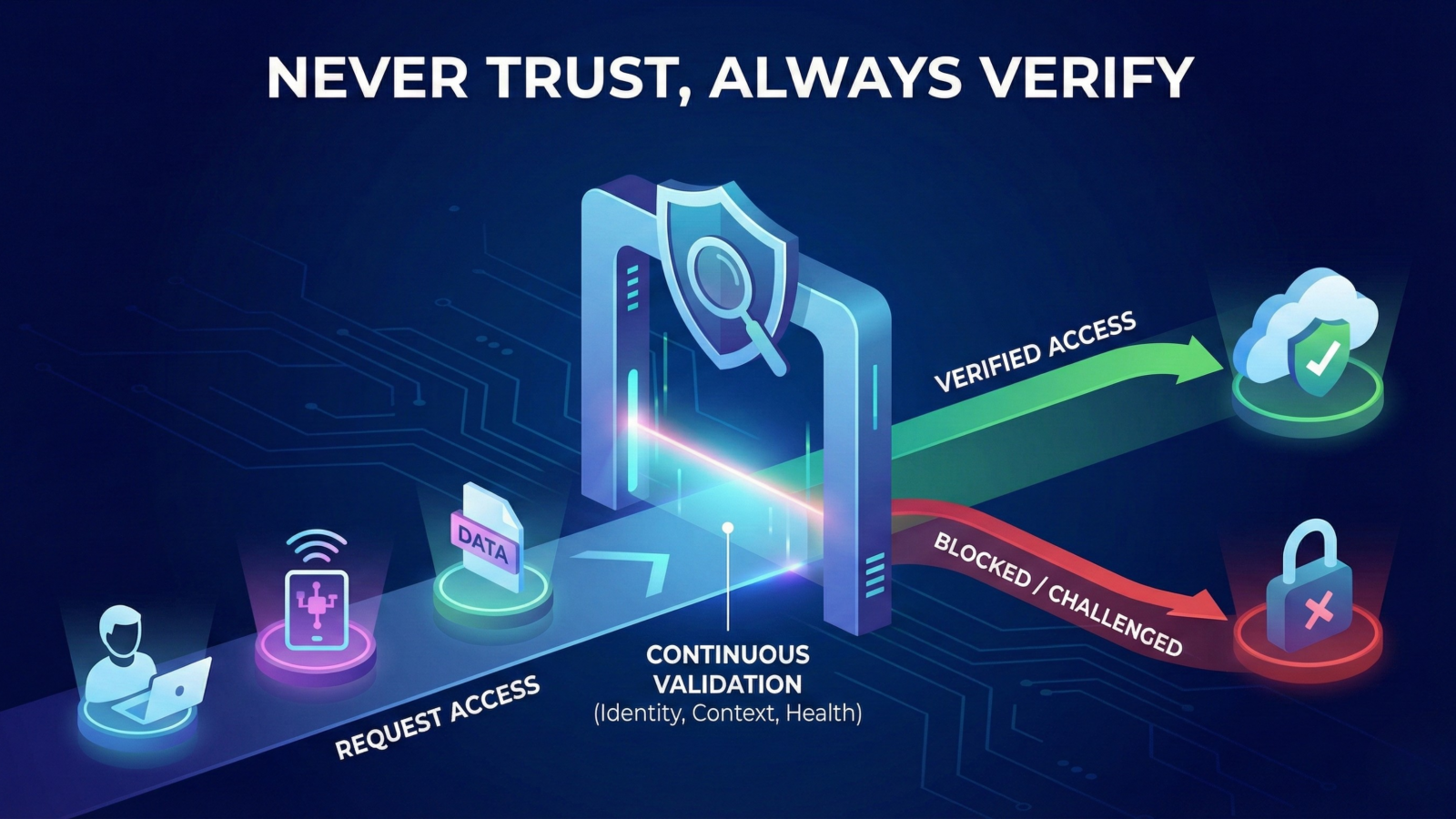
Zero Trust is not a product you buy. It is a mindset you adopt: "Never Trust, Always Verify." It means we verify every single request as if it originates from an open, hostile network, even if it comes from the CEO's laptop.
The Three Pillars of Modern Zero Trust
To build a borderless defense, you must stop looking at networks and start looking at identities. A robust Zero Trust architecture stands on three non-negotiable pillars.
1. Verify Identity (The New Perimeter): In a world without walls, Identity is the new firewall. It is not enough to check a password once. You must verify the context of every login.
- Who is it? (MFA is the floor, not the ceiling).
- Where are they? (Is it normal for this user to log in from Russia at 3 AM?).
- What are they doing? (Why is a Marketing Manager trying to access the Engineering code base?).
2. Verify Device (The Health Check): You might trust the user, but can you trust their machine? If an employee’s laptop is infected with malware or missing a critical security patch, a valid password shouldn't matter. Zero Trust means denying access to unhealthy devices before they even touch your applications.
3. Least Privilege Access (Stopping the Bleed): This is the concept of "Micro-segmentation." Imagine your network is a submarine. If you leave all the doors open, a single leak sinks the ship. Zero Trust closes every door. If a hacker steals a credential, they should only be able to access one specific room (e.g., Email), not the entire building (e.g., Financials, HR, and Code). This contains the blast radius of a breach.
Killing the VPN and The ZTNA Revolution
For decades, the Virtual Private Network (VPN) was the standard for remote access. In a Zero Trust world, the VPN is the biggest vulnerability.
%20vs%20ZTNA.png)
The Problem with VPNs:
VPNs are designed to provide Network-Level Access. Think of a VPN like a master key to an office building. Once a user authenticates, they pass through the front door. After that, they can typically roam the hallways and try to open any door they want. If a hacker steals a remote employee's VPN credentials, they gain that same freedom. They can scan your internal network, find vulnerable servers, and deploy ransomware. The VPN does not inspect what they do after they are inside.
Zero Trust Network Access (ZTNA):
ZTNA changes the rules completely. It replaces Network-Level Access with Application-Level Access. Instead of a master key to the building, ZTNA gives the user a specific key to a single room. When a salesperson logs in, they can only see the CRM application. When a developer logs in, they can only see the coding repository. The underlying network remains completely invisible to them. Even if a hacker compromises their device, they cannot scan the network because they cannot see it. They are trapped in a "segment of one."
Better Security, Better Speed:
Replacing VPNs is not just about security. It is also about performance. VPNs often force traffic to travel back to a central data center for inspection, which slows down the connection. ZTNA allows users to connect directly to the application in the cloud. This is faster for the user and safer for the business.
The "Non-Human" Blind Spot
Most organizations have spent the last five years securing human identities with Multi-Factor Authentication (MFA) and Biometrics. But while we were locking the front door, we left the service entrance wide open.
The Rise of Machine Identity:
In a modern cloud environment, human users are the minority. The vast majority of traffic on your network is Non-Human Identities: APIs, service accounts, bots, and automated scripts talking to each other. For every one human employee, a company typically has at least 10 non-human identities. The problem is that these machine identities often have "god-mode" privileges. A developer might create an API key to let two servers talk to each other, but that key often has no expiration date and access to far more data than necessary.
The East-West Risk:
This creates a massive vulnerability in East-West traffic (server-to-server communication). If a hacker compromises a human user, they are often stopped by MFA. But if they compromise a service account or an API key, they can often move laterally across the entire infrastructure without triggering a single alarm. Since machines are expected to communicate rapidly and at high volume, malicious activity often blends in with normal traffic.
Zero Trust for Machines:
A true Zero Trust Architecture applies the same scrutiny to code as it does to people.
-
Short-Lived Tokens: Never use hardcoded, permanent keys. Use automated tools to rotate credentials every few hours or minutes.
-
Least Privilege for APIs: An API that updates a customer's address should not have "Read" access to their credit card number. Scope the permissions down to the exact function required.
If you don't secure the bots, securing the humans won't matter.
A 4-Step Roadmap to Zero Trust Implementation
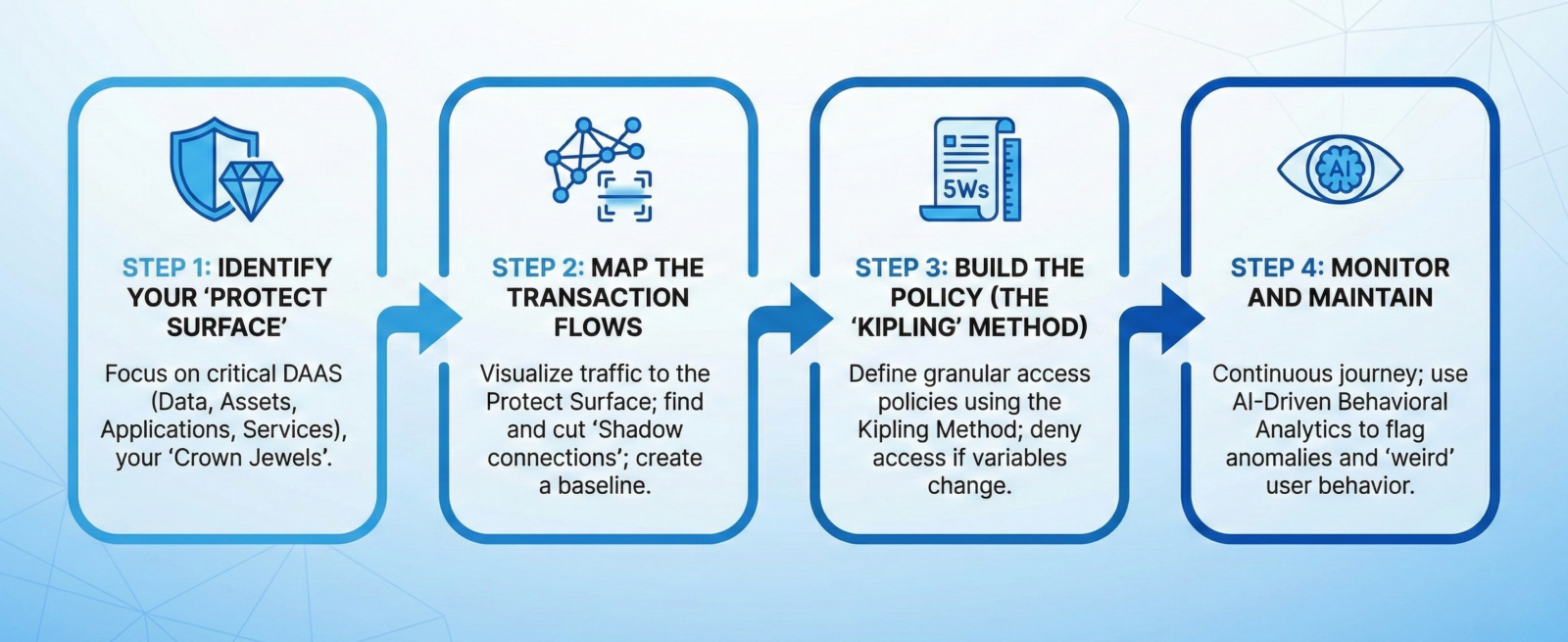
Moving to Zero Trust can feel overwhelming. The secret is not to try and "boil the ocean." Do not attempt to switch your entire organization overnight. Instead, follow this four-step cycle to secure your most critical assets first.
Step 1: Identify Your "Protect Surface"
Traditional security focuses on the "Attack Surface" the massive, ever-changing perimeter of endpoints and users. It is too big to defend perfectly. Zero Trust flips this. Focus on the "Protect Surface" the critical data (DAAS: Data, Assets, Applications, Services) that actually matters.
-
Action: Identify your "Crown Jewels" (e.g., the Customer Database, the Source Code, or the Swift Payment Server). Start your journey there.
Step 2: Map the Transaction Flows
You cannot protect what you do not understand. Before you block any traffic, you must see how it flows.
-
Action: Use a scanning tool to visualize exactly which users and applications are talking to your Protect Surface. You will likely find "Shadow connections" like a forgotten marketing tool reading your financial database that need to be cut immediately.
-
Result: This creates a baseline of "normal" behavior.
Step 3: Build the Policy (The "Kipling" Method)
Now, write the rules. We use the "Kipling Method" (Who, What, When, Where, Why, How) to define granular access policies.
-
Example Policy: "The Engineering Team (Who) can access the GitHub Repo (What) via Corporate Laptops (Where) only during Business Hours (When) to Commit Code (Why)."
-
If any variable changes (e.g., trying to access at 3 AM from a personal iPad), access is denied.
Step 4: Monitor and Maintain
Zero Trust is a journey, not a destination. Once the policy is live, you must continuously look for anomalies.
-
The 2026 Standard: In modern environments, humans are too slow to spot these anomalies. You need AI-Driven Behavioral Analytics that can flag a "legitimate" user doing something slightly "weird," like downloading 5GB of data instead of the usual 50MB.
Conclusion: From "No" to "Know"
For years, security teams were seen as the "Department of No." Their job was to block access, slow down workflows, and restrict innovation.
Zero Trust changes that narrative. It isn't about saying "No" to access; it is about "Knowing" exactly who is accessing what.
When you remove the blind trust from your network, you remove the fear. You can let your employees work from anywhere, on any device, with full confidence that your data is safe. In a borderless world, the only safe assumption is that you are already breached. The only winning strategy is to build an architecture that survives it.
Frequentl Asked Questions:
1. What is the main difference between a VPN and Zero Trust (ZTNA)?
A VPN grants "Network-Level Access," meaning once a user logs in, they can often see the entire network. Zero Trust (ZTNA) grants "Application-Level Access," allowing the user to connect only to the specific apps they need (like Salesforce or Slack), keeping the rest of the network invisible.
2. Does Zero Trust eliminate the need for firewalls?
No, but it changes their role. You still need firewalls to filter traffic, but you can no longer rely on them as your primary defense. In a Zero Trust model, Identity becomes the new perimeter, and firewalls are used more for internal micro-segmentation rather than just border protection.
3. How do you implement Zero Trust for "Non-Human" identities?
Non-human identities (like APIs, bots, and service accounts) must be treated like users. You secure them by rotating credentials frequently (using short-lived tokens), strictly limiting their permissions (Least Privilege), and monitoring their behavior for anomalies just like you would a human employee.
4. Is Zero Trust suitable for small businesses (SMBs)?
Yes. Zero Trust is a framework, not a product. SMBs can start simply by implementing Multi-Factor Authentication (MFA) for all users and removing admin rights from standard employee laptops. You do not need an enterprise budget to adopt the "Never Trust, Always Verify" mindset.
5. What is the first step in migrating to a Zero Trust Architecture?
The first step is to identify your "Protect Surface" - your most critical data and assets. You cannot protect everything equally. Once you identify your "crown jewels," you map the transaction flows to understand who accesses them before applying strict access policies.