
Introduction:
What your team types into ChatGPT and where it actually goes is something most people never question.
Nobody in your company is doing anything wrong. They are just trying to get work done faster. And in doing so, they are handing your most valuable information to a server you do not own, cannot monitor, and never agreed to share with.
Picture a regular Tuesday morning at your office.
SCENE 1 — FINANCE TEAM, 9:47 AM
Your CFO is preparing for a board meeting. She pastes the company's Q3 revenue projections into ChatGPT and asks it to turn the numbers into a clean summary. It takes 40 seconds. She saves two hours.
SCENE 2 — HR MANAGER, 11:15 AM
Your HR head uploads a spreadsheet of 60 employee salaries into an AI tool and asks it to generate a compensation benchmarking report. He has been doing this every quarter. It is faster than doing it manually.
SCENE 3 — SALES DIRECTOR, 2:30 PM
Your top salesperson is drafting a proposal for your biggest client. She copies the entire deal structure, including pricing, discount logic, and custom terms, into ChatGPT to help write the email. The AI produces a great draft in seconds.
Three employees. Three completely reasonable decisions. And by 3 PM, your financial projections, your full salary database, and your most sensitive client deal terms have all left your organisation, quietly, legally, and without anyone raising an alarm.
This is happening right now. In your company. Probably today.
The Numbers Are Hard to Ignore
This is not a theoretical risk. The data on what employees are actually doing with AI tools is already out, and it should make every business owner uncomfortable.
- 77% of employees using AI tools have pasted company data into them.
- 82% of those paste events happen via personal accounts IT cannot see.
- 45% of enterprise employees now use generative AI tools daily.
- 35% of all data typed into AI tools is classified as sensitive.
What Are They Actually Sharing?
When we look at the types of information employees are feeding into AI tools, the list should stop you mid-coffee.
- Client contracts and pricing details — "Help me rewrite this proposal"
- Employee salary and HR records — "Summarise this spreadsheet"
- Financial forecasts and board reports — "Turn these numbers into a narrative"
- Source code and product roadmaps — "Debug this code" or "Improve this feature list"
- Legal agreements and NDAs — "Simplify this contract language"
- Customer data and support histories — "Draft a reply to this complaint"
- Meeting notes with strategy details — "Write action items from these notes"
None of these people are careless. None of them are trying to cause harm. They have found a tool that makes their job easier, and they are using it. The problem is that they do not know, and often nobody has told them, exactly where that information goes once they click send.
"When you paste something into ChatGPT, you are not having a private conversation. You are uploading data to a server in another country that you do not control."
So Where Does It Actually Go?
Most employees picture AI tools like a calculator. You type something in, you get an answer, and nothing is stored. That is not how it works.
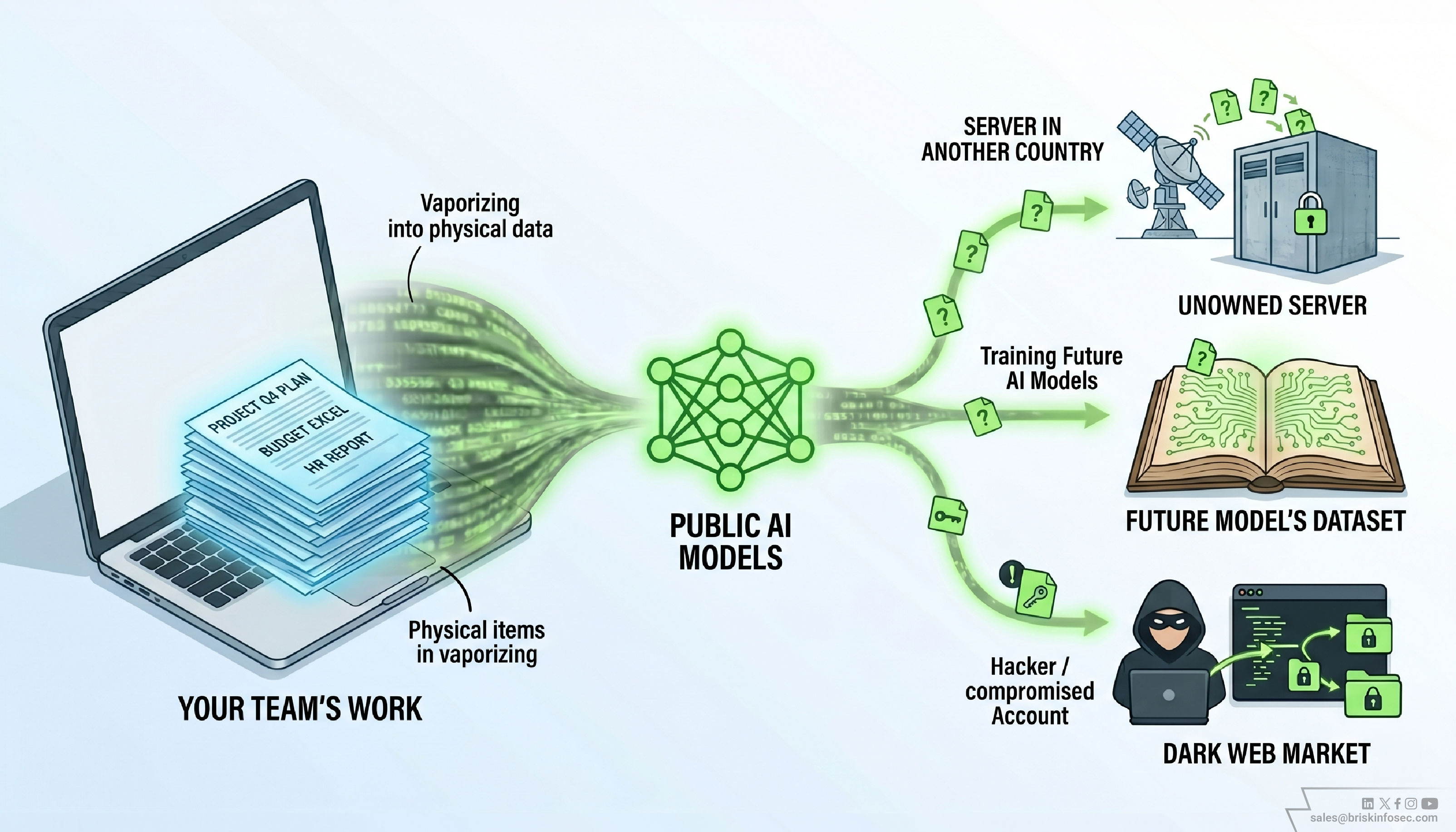
When your team member types something into a public AI tool using a personal account, that data is typically:
What Happens to Your Data
Stored on external servers, sometimes for up to 30 days by default, and sometimes indefinitely depending on the platform's settings and the type of account being used.
Potentially used to train future AI models, depending on the user's account settings and the platform's terms of service. Inputs may be used to improve the AI, and most personal accounts opt in by default.
Accessible if that account is compromised. Security researchers found over 225,000 sets of AI account credentials for sale on dark web markets in 2025. If a hacker gets into your employee's personal ChatGPT account, they can read every conversation that employee ever had, including the one with your salary spreadsheet.
This Already Happened to a Company Bigger Than Yours
Real Incident:
A large global technology company's semiconductor engineers were using ChatGPT to help debug code and solve technical problems. In three separate incidents within a single month, employees pasted confidential source code, internal meeting notes, and proprietary hardware data into the chatbot.
They were not being reckless. They were trying to work faster. The moment that code entered a public AI system, it left the company’s protected environment permanently.
The response was swift. The organization banned all use of generative AI tools for employees and began building its own internal solution. The damage to its intellectual property had already been done.
The company has over 270,000 employees and a dedicated global security team. If it happened to them, it is happening in businesses far less equipped to notice.
The Part That Should Worry You Most
Unlike a data breach, where an alarm goes off, logs show an intrusion, and you can identify a moment when security was compromised, this type of leak is completely silent.
There is no alert. No notification. No indication that anything unusual happened. Your finance manager got her board summary. Your HR head got his report. Your salesperson sent a great email. Everyone went home happy.
And somewhere on a server you have never visited, under a terms of service agreement your employee never read, your most sensitive business information is sitting quietly, waiting.
The Hidden Risk Nobody Talks About
In July 2025, thousands of private ChatGPT conversations became accessible via Google search, not because of a hack, but because of a misconfigured sharing setting. Conversations that users thought were private appeared in public search results. Some contained internal business strategy, client details, and confidential negotiations. The people who shared that data had no idea it was visible.
Why Your Team Does Not Think They Are Doing Anything Wrong
Research from 2025 shows that most employees view AI interactions the same way they view a verbal conversation, temporary, contained, and private. They do not think of typing into ChatGPT as "sending a file to an external server." They think of it as "asking a smart assistant a question."
This is not a training failure. It is not carelessness. It is a natural assumption that has never been corrected, because in most companies, nobody has sat down and explained how these tools actually work.
The employees using AI tools with zero security oversight are not the reckless ones. They are often your highest performers, the people who want to move faster, do more, and deliver better results. They found a tool that helps them do that. The problem is that the tool was not designed with your business's confidentiality in mind.
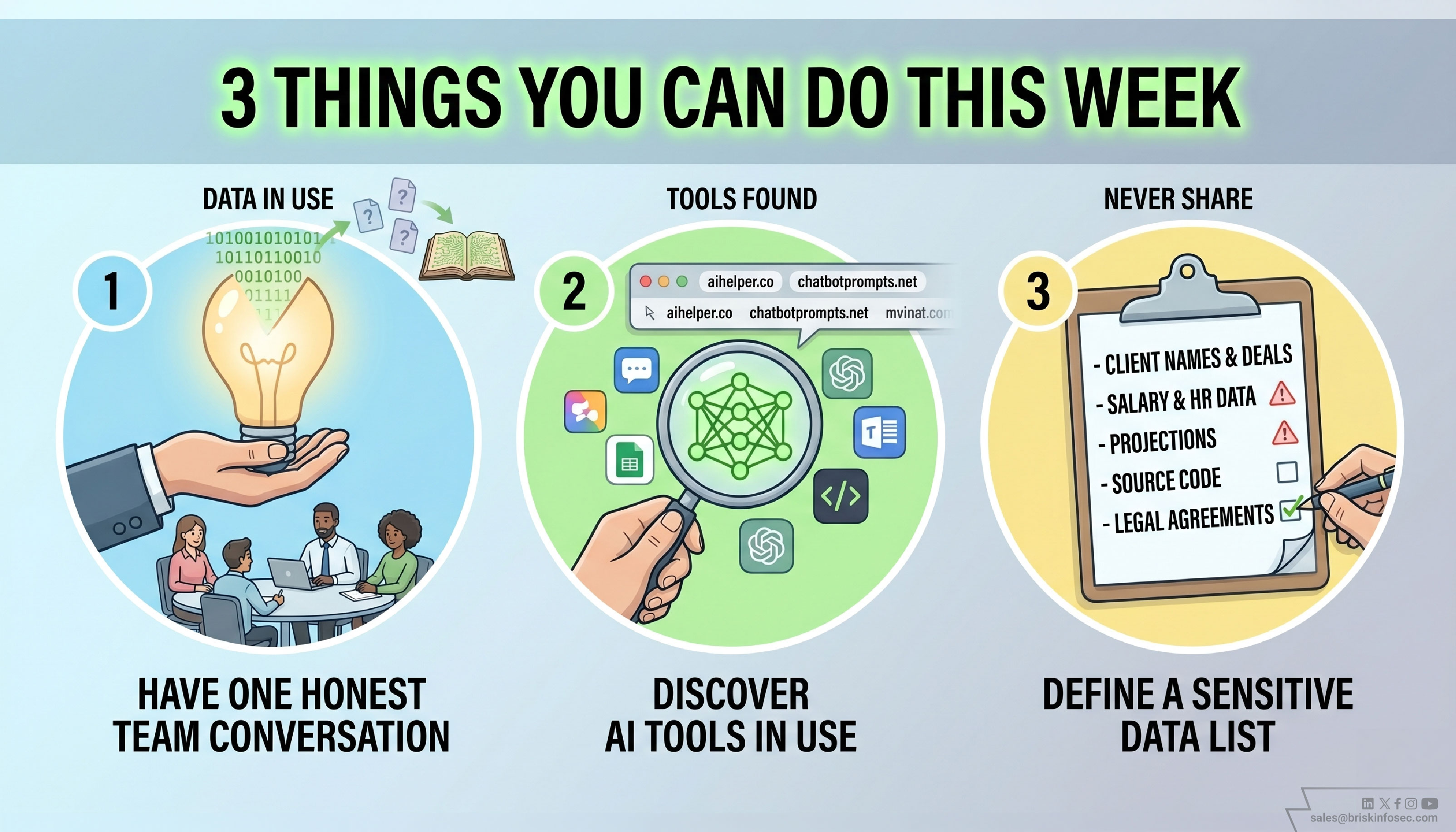
3 Things You Can Do This Week
You do not need a new policy document. You do not need an IT overhaul. Start with these three things.
1. Have one honest conversation with your team
Not a lecture. Not a threat. Just a 10-minute conversation at your next team meeting that covers three points: here is what happens when you paste company data into a public AI tool, here are the types of information we never share externally, and here is what you should use instead. Most people will immediately change their behaviour once they actually understand the risk. Right now, most of them simply do not know.
2. Find out what AI tools your team is already using
Ask openly. Ask your managers. Ask your IT team to check which AI-related domains have been visited on company devices in the last 30 days. You will almost certainly find tools being used that nobody officially approved. This is not a problem to punish. It is information you need to manage the risk properly.
3. Define a short list of things that never go into a public AI tool
You do not need a 20 page policy. You need a one page list: client names and deal details, employee salary and HR data, financial projections and board materials, legal agreements, source code or product specs. Put that list somewhere visible. The goal is not to stop people using AI, it is to make sure the information that could damage your business never leaves your control.
Conclusion - This Is Not About Banning AI Tools
AI tools are genuinely useful. Your team using them is a sign they want to do good work efficiently. The goal is not to take that away from them.
The goal is to make sure that in the rush to move faster, your client relationships, your financial position, your employee trust, and your competitive edge are not quietly walking out the door, one helpful prompt at a time.
The companies that will come out ahead in the next five years are not the ones that banned AI tools. They are the ones that used them intelligently, with clear boundaries, and with their team actually understanding what those boundaries are and why they exist.
FAQ:
1. Is it safe for employees to use ChatGPT at work?
Using ChatGPT at work can be safe if employees avoid sharing sensitive or confidential data. Risks arise when business information like financials, client details, or internal documents are entered into public AI tools.
2. What kind of company data should never be shared with AI tools?
Businesses should never share client contracts, employee salary data, financial reports, legal agreements, source code, or any confidential internal information with public AI tools.
3. What happens to data entered into ChatGPT?
Data entered into ChatGPT may be stored, processed, and in some cases used to improve AI models, depending on the platform settings and account type being used.
4. Why is employee use of AI tools considered a security risk?
Employees often use AI tools through personal accounts without security monitoring. This can lead to unintentional exposure of sensitive business data without any alerts or visibility.
5. How can companies prevent AI-related data leaks?
Companies can reduce risk by educating employees, identifying which AI tools are being used, and clearly defining what data should never be shared with public AI platforms.